Announcements.
Event calendars, official announcements and every recorded run.
Loading announcements
Event calendars, official announcements and every recorded run.
Info
Dear Rovers,
The limited test for Tiered Client Resource Downloads is now live! Rovers who have been granted test access can now download the package that best suits your needs for an optimal gaming experience.
Test Platforms:
- PC (※Official Launcher)/iOS /Android
Instructions:
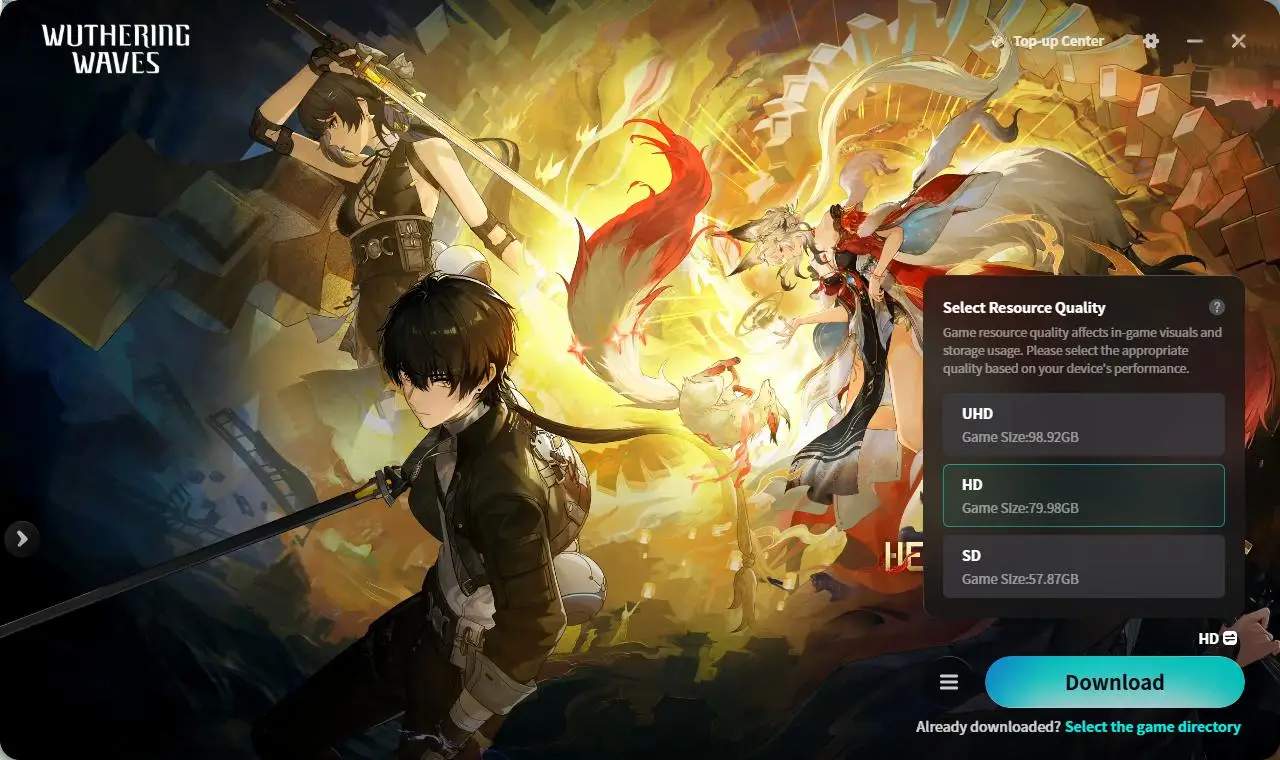
- PC: If you're in the test, you can download and switch between three package tiers directly in the launcher: UHD, HD, and SD. Following the Version 3.7 update, PC users who have not been granted access to the limited test will have their resource package updated to the High-Definition (HD) version by default. Once you enter the test, you can adjust the resource tier based on your needs.
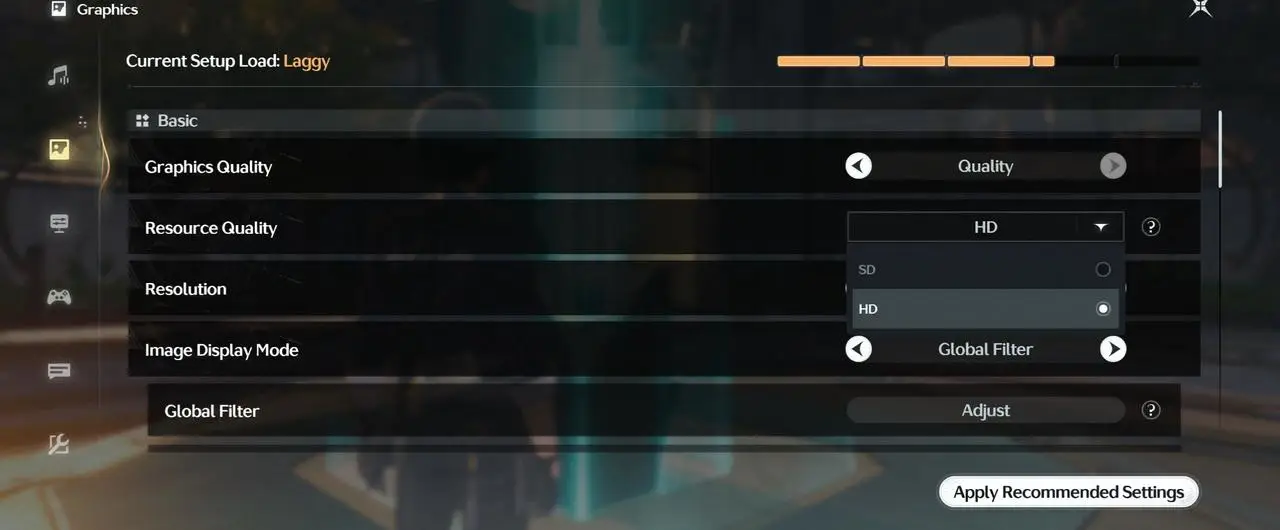
- iOS/Android Mobile: This feature is available across all iOS/Android mobile devices. You can access it via Settings > Graphics > Resource Quality.
>>>Feature Overview<<<
What is Tiered Client Resource Downloads?
Tiered Client Resource Downloads is a feature that allows you to select between different resource tiers. In future versions of Wuthering Waves, the original single resource package will be divided into three tiers based on differences in graphics quality, models, and other game assets: UHD, HD, and SD. You may select and download the tier that best suits the storage space and specifications of your device.
This feature is designed to allow you to choose better graphics quality or lower storage space usage based on your actual gaming needs, thereby providing a better gaming experience.
Tier Specifications
Tiered Client Resource Downloads will be available for the PC, iOS, and Android versions of the game. The package tiers vary in in-game graphics quality, video bitrate, and other game assets. Supported platforms and tiers are outlined below:
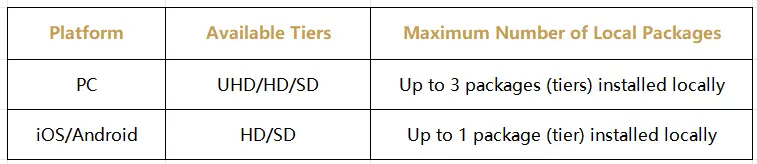
※Due to platform restrictions, platforms not listed above currently do not support resource tiering. Once this feature goes live, the HD package will be downloaded by default on those platforms.
※Due to hardware limitations, only the SD package is available on certain mobile devices, in order to ensure a stable, smooth gaming experience. Please refer to your actual in-game experience.
Package Downloading & Switching
PC
Download your desired tier or tiers directly from the launcher. You can install up to 3 different tiers locally and switch between them any time. If you have multiple tiers installed, to run the game, simply choose one tier from the launcher to launch (only one can run at a time). If you need to uninstall a specific tier, select the corresponding package before uninstalling.
iOS / Android
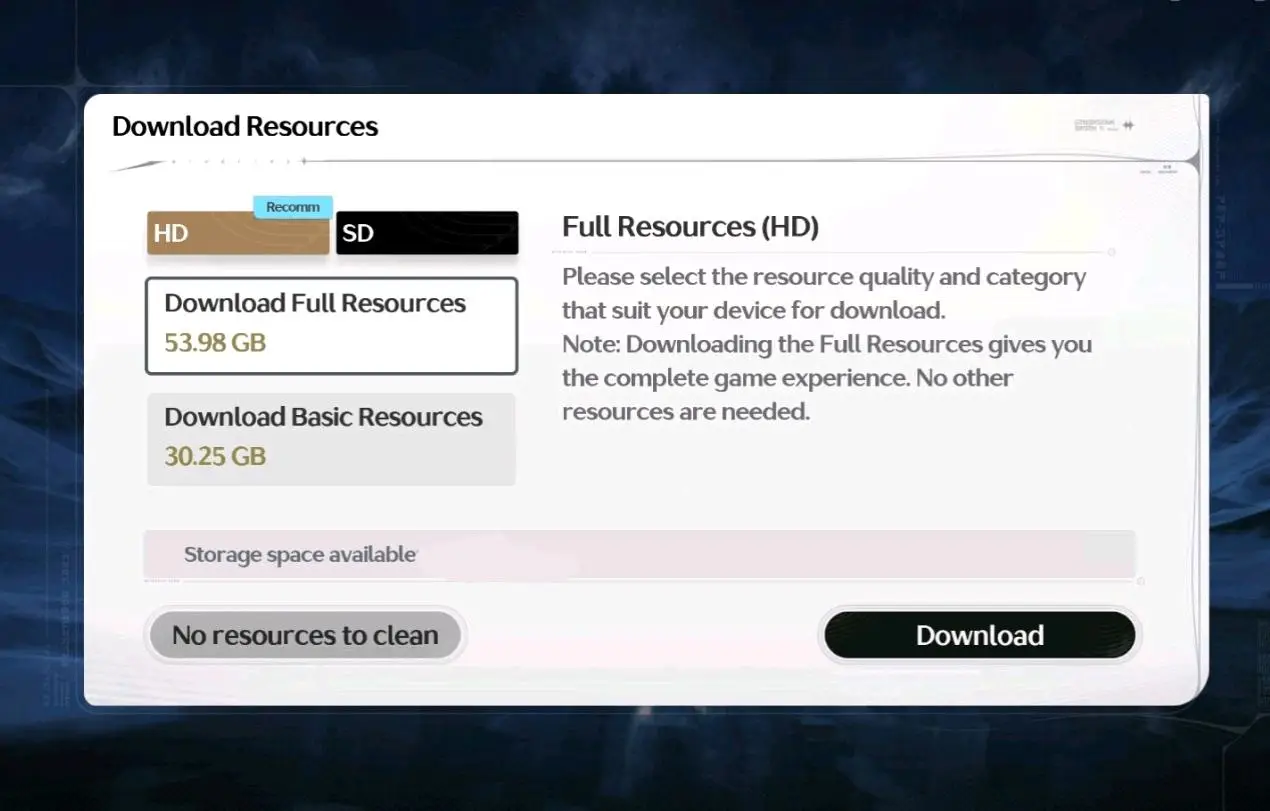
Select your desired package tier from the in-game "Download Resources" menu. Once the download is complete, you can redownload and switch to another tier via Settings > Graphics > Resource Quality.
※On mobile devices, every switch between packages requires downloading the difference between the HD and SD packages.
>>>Notes & Reminders<<<
How to Choose a Package Tier
After the Version 3.7 update, if you have been included in the limited test, the recommended package will be marked on your device based on the device specifications. Alternatively, you can refer to the following specs table to select the right package.
PC

iOS

Android

About In-Game Resource Adjustments
Graphics Resource Adjustments
After the release of the "Tiered Client Resource Downloads" feature, the Ultra Quality option in the in-game Graphics Quality settings will be available only in the UHD package. Therefore, after Version 3.7 goes live, if you are not in the limited test, you will temporarily be unable to enable the Ultra Graphics option on PC. To enable this option, you need to download the UHD package first after entering the test.
Video Resource Adjustments
After the release of the "Tiered Client Resource Downloads" feature, bitrates of certain cutscenes and other video assets will be adjusted accordingly; consequently, visual fidelity may differ between packages.
Following the Version 3.7 update, because PC users who have not been granted access to the limited test will download the HD package by default, the visual performance of certain video resources may be somewhat different from the previous versions. When you are granted test access, you can download the UHD package for higher bitrates.
Future Resource Adjustments
The upcoming "Tiered Client Resource Downloads" feature is currently under continuous optimization. In the future, we may adjust the resources included in each tier based on in-game performance and player feedback. The adjusted resources may differ slightly from those in the current test version. Announcements about adjustments in this regard will be made during the corresponding versions. Please stay tuned.
About Release Schedule on PC Platforms Using Non-official Launchers
Steam
To bring the "Tiered Client Resource Downloads" feature to Steam, we plan to release the official launcher on this platform in the future. When the Official Launcher becomes available on Steam, the platform will also support pre-download for the game. Please remember to update your launcher and experience the new features. These features are currently under active development and will be made available as soon as possible. We will notify you of the release schedule and detailed instructions on how to update the launcher in future announcements. Please stay tuned.
>>>FAQ<<<
Q: Are package tiers the same as in-game graphics settings?
A: No, they are different. The package tier determines the upper limit of the quality of the downloaded resources, such as image clarity and video bitrate, while in-game graphics settings remain adjustable. However, visual performance and resolution will vary from tier to tier even with the same graphics settings. For example, with the High Quality option enabled, the UHD package delivers higher image clarity and shows more details than the HD package.
Q: What are the differences between the various package tiers?
A: The package tiers vary in package size, video bitrate, and highest available resolution. For instance, the differences between the available tiers in Version 3.7 are as follows:
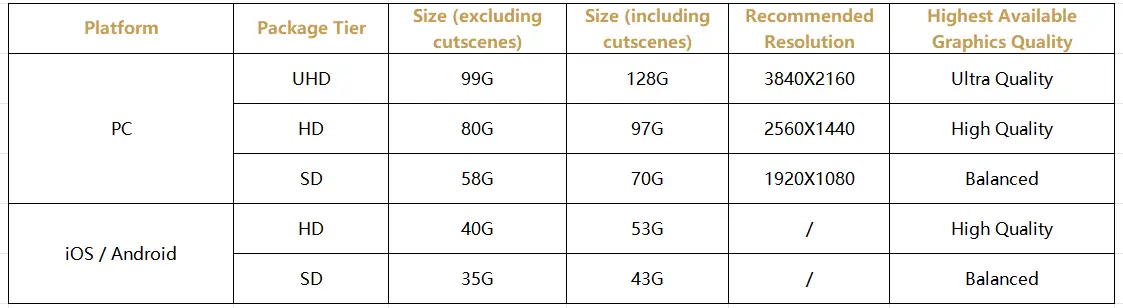
※Package sizes shown are estimates. Please refer to the actual sizes in Version 3.7.
Q: How do I know which package to choose?
A: If you have been included in the limited test, the recommended package will be marked on your device based on the device specifications. Alternatively, you can refer to the specs table listed in the "How to Choose a Package Tier" section.
Q: Can I download a tier higher than what is recommended?
A: Yes. The recommendation is made based on your device specifications. You are free to download any tier you prefer. However, downloading a tier higher than recommended will take up unnecessary storage space and could cause framerate fluctuations, device overheating, and other issues. Please adjust accordingly based on your experience.
※Due to hardware limitations, only the SD package is available on certain iOS/Android devices, in order to ensure a stable, smooth gaming experience.
Q: How many packages can I install locally?
A: Up to 3 different package tiers can be installed locally at the same time on PC; there is no need to uninstall existing tiers before downloading new ones. Only 1 package tier can be installed locally at the same time on mobile devices, and every switch between packages requires downloading the difference between the packages.
Q: How do I switch between tiers after completing a download?
On PC, simply select and launch the desired tier in the official launcher with no redownload required (only one tier can be launched at a time). On iOS/Android, go to Settings > Graphics > Resource Quality in-game to download and switch to the target package.
Q: Why can I only select the SD package on my phone?
A: Due to hardware limitations, only the SD package is available on certain mobile devices, in order to ensure a stable, smooth gaming experience.
Q: Why is it that my launcher doesn't have a tier selection option?
A: The "Tiered Client Resource Downloads" feature on PC is rolled out gradually via a limited test. If your launcher doesn't have a tier selection option, it means that you are currently not in the limited test. We will include more and more players in the test based on player feedback until full release.
Q: Why is the Ultra Quality option missing from the in-game Graphics Quality settings on my device?
A: After the release of the "Tiered Client Resource Downloads" feature, the Ultra Quality option will be available only in the UHD package. If you cannot access this option, it means you are currently not in the limited test, or are in the test but have not downloaded the UHD package.
You can check the launcher to see if the UHD package is available for download. You can enable the Ultra Quality option once you enter the limited test and download the UHD package.
Q: Can I participate in the test if I'm not using the official launcher on PC?
A: The test is currently available only on PC devices using the official launcher. Access to this feature will be gradually opened to other PC platforms with non-official launchers once the test concludes. For details, please refer to the "About Release Schedule on PC Platforms Using Non-official Launchers" section.
Q: Will the resources of each tier change in the future?
A: The upcoming "Tiered Client Resource Downloads" feature is currently under continuous optimization. In the future, we may adjust the resources included in each tier based on in-game performance and player feedback. The adjusted resources may differ to some extent from those in the current test version. Announcements about adjustments in this regard will be made during the corresponding versions. Please stay tuned.
We will continue to refine the "Tiered Client Resource Downloads" feature based on player feedback. If you encounter any issues or have any suggestions, please access the in-game [Feedback] feature to submit your feedback. Thank you for your support and understanding.
Wuthering Waves Dev Team